

Applications & API Keys
Create and manage the applications and API keys that authenticate your payment integration.
Understanding applications
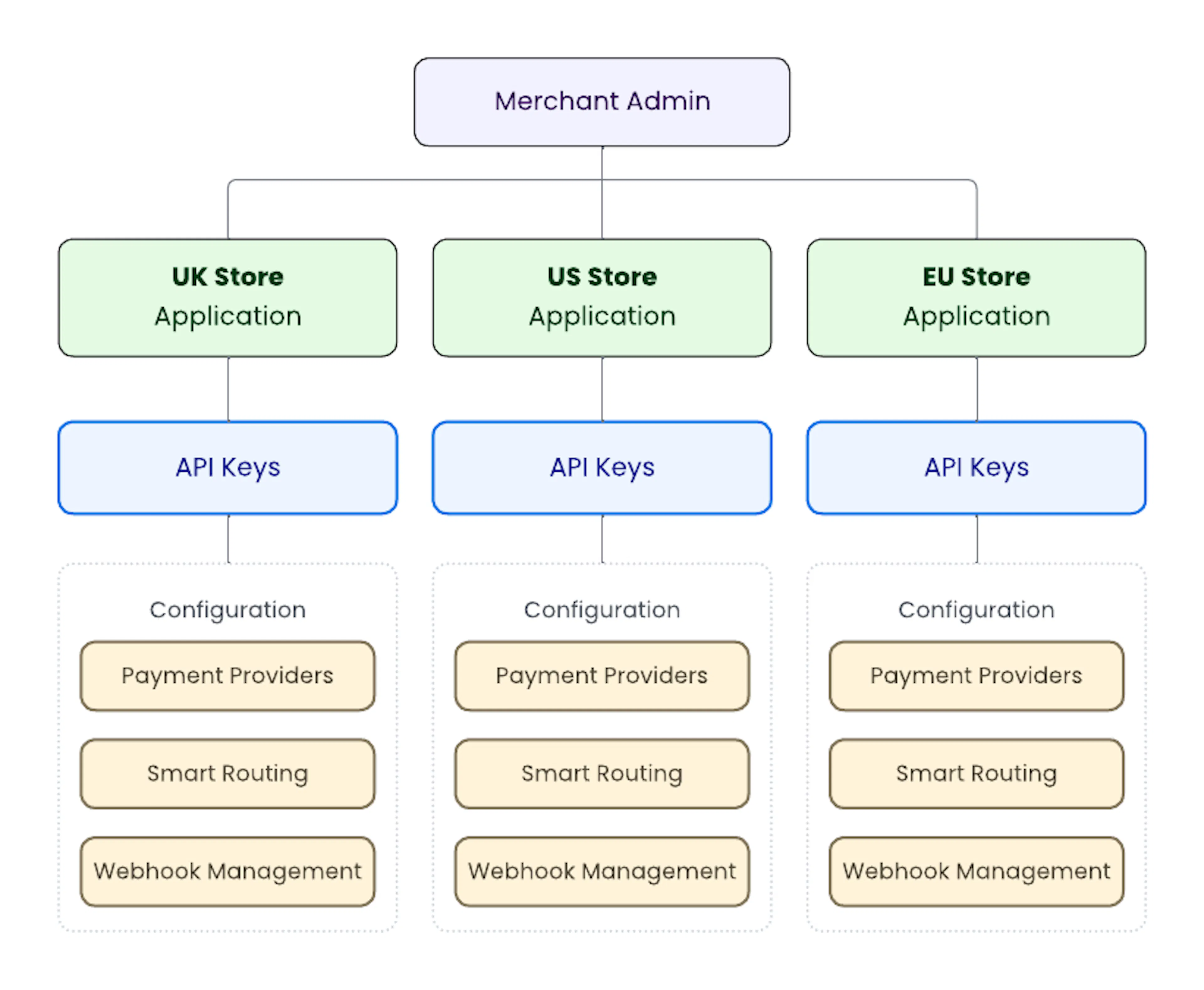
An application is a logical grouping within your merchant account, typically representing a single integration. For example, you might create one application for your production web store and a separate one for your staging environment.
API keys belong to applications. When your server makes a payment API call, it authenticates with a key scoped to a specific application. This means you can rotate or revoke keys for one integration without affecting others.
A typical setup looks like this:
Create an application
All management API calls require a valid JWT in the Authorization header.
See [Get Started] if you haven't obtained one yet.
POST /api/v1/applications

{
  "name": "Production Web Store",
  "description": "Primary e-commerce backend"
}
name is required and must be unique within your merchant account.
description is optional.
{
  "id": "uuid-v4-app-123",
  "name": "Production Web Store",
  "description": "Primary e-commerce backend",
  "isEnabled": true,
  "createdAt": "2026-02-23T12:00:00Z"
}
Common errors
| Status | Meaning |
|---|---|
| 400 | Validation failed. Check name is present and within 100 characters |
| 409 | An application with that name already exists for your merchant account |
Generate an API key
Once your application is created, generate an API key for it. Use the id returned from the create application response.
POST /api/v1/applications/{id}/api-keys

{
  "description": "Primary checkout key"
}
{
  "id": "key_uuid_888",
  "applicationId": "uuid-v4-app-123",
  "fullKey": "ks_live_abc123xyz...",
  "keyPrefix": "ks_live_abc1",
  "description": "Primary checkout key",
  "createdAt": "2026-02-23T13:30:00Z"
}
The fullKey is returned only once. Copy and store it securely immediately as it cannot be retrieved again. If you lose it, revoke the key and generate a new one.
description is required and helps you identify the key later. Keep it meaningful; for example, "Production checkout service" rather than "Key 1".
Using your API key
Include your API key as a Bearer token in payment API calls from your server:
Authorization: Bearer ks_live_abc123xyz...
Never expose your API key in client-side code, browser requests, or version control.
Common errors
| Status | Meaning |
|---|---|
| 400 | Maximum number of API keys for this application has been reached |
| 404 | Application not found |
List applications
Retrieve all applications for your merchant account.
GET /api/v1/applications?include=apiKeys&page=1&limit=10
{
  "items": [
    {
      "id": "uuid-v4-app-123",
      "name": "Production Web Store",
      "description": "Primary e-commerce backend",
      "isEnabled": true,
      "createdAt": "2026-02-23T12:00:00Z",
      "apiKeys": [
        {
          "id": "key_uuid_888",
          "keyPrefix": "ks_live_abc1",
          "description": "Primary checkout key",
          "status": "active"
        }
      ]
    }
  ],
  "page": 1,
  "limit": 10,
  "totalItems": 1,
  "totalPages": 1,
  "hasPreviousPage": false,
  "hasNextPage": false
}
Revoke an API key
Revoking a key removes access immediately. Other keys for the same application continue to work.
DELETE /api/v1/applications/{id}/api-keys/{keyId}
A successful revocation returns 204 with no response body.
Common errors
| Status | Meaning |
|---|---|
| 400 | Key is already revoked |
| 404 | Key not found |
Enable or disable an application
You can disable an application without deleting it. Disabling an application prevents all its API keys from being used.
PATCH /api/v1/applications/{id}/status

{
  "isEnabled": false
}
{
  "id": "uuid-v4-app-123",
  "name": "Production Web Store",
  "isEnabled": false,
  "createdAt": "2026-02-23T12:00:00Z"
}
What's next
With an application created and an API key in hand, you're ready to start accepting payments.